Monday, 14 July 2014

How to Password Lock Chrome & Firefox

This post will show you how to Password Lock your browser if they are Chrome or Firefox.

1. Chrome:

You will need to add the extension from the chrome store called ChromePW. This extension will act up as the browser opens and asks for your password before you can browse.

If you type the wrong password or click anywhere on the browser it will close itself and you will have to restart the browser and type it again.

The Link:

ChromePw

2. Firefox:

Similar to Chrome Firefox has an add-on called Master Password+ which basically applies your master password for your saved passwords on Firefox.

This Add-on does not even allow the browser to start if the password is not given or typed wrong.
This even applies for when it is minimized for some time, but the settings can be adjusted to your personal way.

The Link:

Master Password+

Test These applications at your own risk. If you forget your password there are very small number of ways that you can reset the password. The major one is uninstalling the browser.

These app are for those who wish to keep their privacy and do not want others snooping at your browser or it's history.

How to change MAC Address on Windows without using a single tool.

This topic has been written in order to teach you how to change your Windows' MAC Address without using a single tool.

But first, What is MAC Address?

According to Wikipedia:

A Media Access Control Address (MAC Address) is  unique identifier assigned to network interfaces for communications on the physical network segment.

In Layman's Terms

Mac Address


A Media Access Control Address, also known as a hardware or physical address, is a unique value associated with the network adapter on your computer. Basically, it’s what’s used to identify and associate with a system over a local network.


Requirements:
Windows OS (7, XP, etc.)
Step by step How to Change MAC Address on Windows:

1. Open our command prompt (press windows key + R and type cmd).

type ipconfig /all to view our MAC address.The Physical Address is our MAC Address

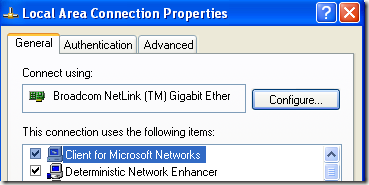
2. Click on Start, then Control Panel, then Network Connections, and right-click on the network connection you want to change the MAC address for and select Properties. It will normally either be Local Area Connection or Wireless Network Connection.

http://www.online-tech-tips.com/wp-content/uploads/2008/09/localareaconnection.png

 3. A connection window now will pop up. Click configure button.

configure network

4. Now click on the Advanced tab and click on the “Locally Administered Address” property or the “Network Address” property.
http://www.online-tech-tips.com/wp-content/uploads/2008/09/locallyadministeredaddress.png
5. By default, the “Not Present” value is selected. Go ahead and click on the Value radio button and enter in a new MAC address. The MAC address is a combination of 6 pairs of numbers and characters, i.e. 40-A2-D9-82-9F-F2. You should enter the MAC address without the dashes.

new mac address

 6. You can check that the MAC address has been changed by going to the command prompt and typing in Ipconfig/All. Go ahead and restart the computer in order for the changes to take effect.

 Conclusion:

This MAC change method is useful to do a hit and run. Network admin sometimes banned user from the MAC address, so we just need to change the MAC to bypass the ban :-D.

Step by step How to Change MAC Address on Windows:

1. Open our command prompt (press windows key + R and type cmd).
type ipconfig /all to view our MAC address. On this picture is my MAC address.
- See more at: http://www.hacking-tutorial.com/tips-and-trick/how-to-change-mac-address-on-windows/#sthash.rOMj5qRe.dpuf

Step by step How to Change MAC Address on Windows:

1. Open our command prompt (press windows key + R and type cmd).
type ipconfig /all to view our MAC address. On this picture is my MAC address.
- See more at: http://www.hacking-tutorial.com/tips-and-trick/how-to-change-mac-address-on-windows/#sthash.rOMj5qRe.dpu
Wikipedia says:
A media access control address (MAC address) is a unique identifier assigned to network interfaces for communications on the physical network segment. MAC addresses are used as a network address for most IEEE 802 network technologies, including Ethernet. Logically, MAC addresses are used in the media access control protocol sublayer of the OSI reference model.
- See more at: http://www.hacking-tutorial.com/tips-and-trick/how-to-change-mac-address-on-windows/#sthash.rOMj5qRe.dpuf